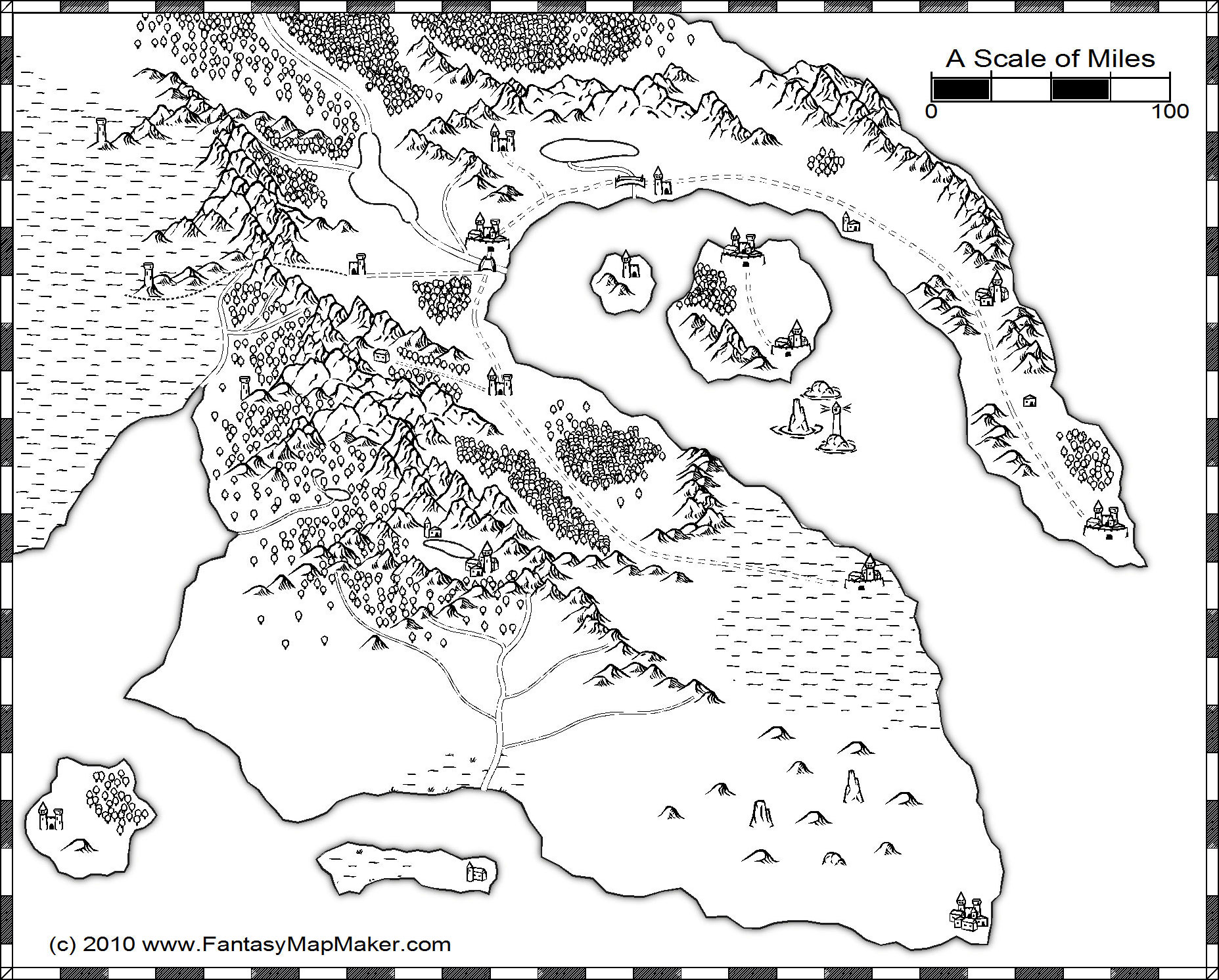
This map was made with Campaign Cartographer and CC3’s Overland Black & White style pack. There’s nothing fancy about this style, but it’s dead simple to use and super-fast to get the map done.
I purposefully left the map unlabeled so you can print it out and add your own names. The map is plenty big – 1855×1491 pixels – so you should have more than enough room to add your own text. Just middle-click on your mouse to open the image up in a new tab at full size (if your mouse doesn’t have a middle button, then… for the love of Pelor, it’s time to upgrade!).
Please follow and like us:





hi, i am writing a story, and will be needing an awesome map for it. I think this is that map. I just need your permission. May i have it? (i may also edit it at areas, and perhaps add borders for the countries.)
Hi Pan,
As long as your project doesn’t violate this license, then you absolutely have my permission. You can use it, edit it, whatever.
If you need the map for commercial purposes, just shoot me an email and we can discuss.
John,
Thank you. Although i must confess this map is simply a little project a friend and I will be working on. Your permission has just made me a very happy man today.
(Shall i just refer to you as John in the credits?)
You could just mention my website, http://www.FantasyMapMaker.com, in case your readers would like to see more maps. Thanks, and good luck with your story!
Thanks for the great map! I am using it for my D&D campaign. I edited out some of the towns, because there were just too many for me to think of names for, lol. I got a great compliment on it, too! Thanks for the work- you make my work easy. 😀
Hi Elyse, you did a great job naming everything – makes me glad I didn’t do it myself! I also like the Google Maps implementation.
Hey John, I wanted to use the map for a campaign, but I can’t seem to save it, am I doing something wrong?
Yeah, the lightbox looks pretty but isn’t great for saving images.
Right-click on the image’s thumbnail and select “open in new tab” or “open in new window.” Then you should be able to right-click and “save as” to save the file to your computer.
This is the best map of yours I’ve seen so far I think. I want to ask though, do you hand draw any of them first? Or do you start and finish with the map making program thingy? Personally, I’ve been making maps for about 6 years now and I’m just curious about your process.
@Zach – I have always just done it all in CC3 without drawing anything ahead of time. Sometimes I have an idea in mind, but usually I start with a blank slate and use the software to explore ideas and build as I go along. It’s pretty easy to make changes on the fly, so I’ve never felt like I needed to have things planned out before committing.
The exception to that is when I have an idea for a map pop into my head and I don’t have my computer nearby. Then I might sketch something out so I can refer to it later.
Hey John,
I’m Jumpoy and I’m trying to write a fantasy novel and I was wondering if I could use this map for it. Do you want me to give you any credit? I was hoping to also change things around a bit (you know, move some cities around change some landmarks, fiddle with the coastlines).
Hi Jumpoy – technically, this map is uncopyrighted, so you can do whatever you want with it. However, a link back to this page with attribution is always appreciated.
Good luck with your novel!
Ive been looking for a map everywhere that I could use for my D&D campaign because Im so new to DMing I didnt I wanted to have a basis for what Im doing you map is really helping thank you!!!
Glad you enjoyed the map Lily. Good luck with your new role as DM.
hello sir.
can i use some of your maps as part of my animation project?
i am looking for magical/fantastical maps that suits my elf characters and i found yours, and it’s great. i’ll just erase some drawings(but if you’ll not allow it, it’s still ok)) into it but i promise that i’ll post your website on the credits of my work. thank you and God bless. 🙂
Yes you can. See here for my copyright policy. Just make sure the images are mine and not from a guest poster (that should be stated in the post).
Good luck and please post back if your project is online somewhere.
Hello,
I loved your black and white map. Did you make an entire world?
I’ve tried my hand at designing one myself, do you make custom maps?
Thanks,
Jim
hi…i love your map.
but i dont want to steal it. you’ve probably been around, so i want to ask you – do you know of any free or very cheap map generators that might do something like this?
im looking for something that can do coastlines, land features, cities, and roads.
i can do the names myself.
i’ve spent hours searching so if you have some advice that would be awesome!!
p.s. your site is great.
Hi Charlotte,
AutoRealm is free and is similar to Campaign Cartographer.
Gimp is also free and is a good option if want something more similar to PhotoShop.
thanks i’m trying autorealm
Hi- love the map! I’ve been looking for just such a map to use commercially in a “Teachers Pay Teachers” product. I would need to edit the map to fit my needs but it would be the basis for a digital file that teachers could buy to allow students to design a medieval village/manor. The product would have a credits page where I would be happy to give attribution. I would also leave the copyright at the bottom of the map intact (unless after changes you prefer it’s removed?). I want to be sure and give credit where credit is due! Is this something you would consider? Thanks!
Hi Chrissie. That would be fine. I have a pretty lax uncopyright policy. Good luck with your product!
Hello there! I already read your copyright policy and how lax you are but nevertheless, I wanted to let you know that I will be using this particular map in my novel. I hope that’s alright and I do promise to credit you! It’s really simplistic but it’s just what I need. Thank you very much!